
On this page
- Why automatic language redirects are tempting
- What Google says about redirecting by language
- How does a browser tell a site which language a visitor prefers?
- Should you redirect based on browser language? Your three choices
- Rules that keep a redirect safe for visitors and search
- How to check what your site does today
- Common questions
- Should the language suggestion be written in the visitor's language?
- Does a redirect slow the page down?
- What about visitors who use a VPN?
- Is a language selection page on the home page a good idea?
Most websites should not redirect based on browser language. Google advises against sending visitors to another language version on a guess, because visitors and search engines may then never see your other versions. The safer choice is to suggest the visitor's language with a small banner, and to redirect only from a page with no language of its own.
If you look after a site in two or more languages, the idea comes up sooner or later. A visitor from Lyon lands on the English home page, so why not send them to the French one straight away? This article covers what Google says, how a browser tells a site which languages its user reads, the three choices you have, and the rules that keep any redirect safe. It ends with a short check you can run on your own site.
Why automatic language redirects are tempting#
The case for a redirect is easy to make. A visitor who reads Spanish and lands on English text may leave before they find the language switcher. A redirect seems to remove that step: the right language, with no click. It also looks good in your numbers, since more visitors start on a page in their own language. It is often a single setting in a translation tool or theme, so it gets switched on without much thought.
The trouble is that a redirect makes a guess for the visitor, and guesses go wrong in a few familiar ways:
- The browser language is not always the reader's choice. The W3C's article on language negotiation points out that people use shared or borrowed computers, and that some prefer to read the original rather than a translation. Think of a guest on a hotel lobby computer, or a Dutch marketer whose laptop came set to English.
- Shared links stop working as sent. A customer sends a friend the link to your French page. The friend's browser is set to English, so the site sends them somewhere else.
- Search engines may miss pages, which is the part Google writes about.

What Google says about redirecting by language#
Google's guide to multilingual sites is direct. As of November 2026 (the page was last updated on 10 December 2025), it says: "Avoid automatically redirecting users from one language version of a site to a different language version of a site. For example, don't redirect based on what you think the user's language may be." The next sentence gives the reason: such redirects "could prevent users (and search engines) from viewing all the versions of your site."
The same guide, and Google's page on locale-adaptive pages, explain how search engines are affected. If you reroute users based on language settings, Google says it "might not find and crawl all your variations", because its crawler usually comes from the USA and sends its requests without any language preference. In plain terms, Google's crawler arrives with no language list at all. Whatever your site does for a visitor with no preference is what Google sees.
This is a warning about discovery. Google's page does not describe a ranking penalty for redirects; it says the crawler may not reach every version, and a page it never reaches cannot appear in results in any language.
What Google recommends instead is a separate URL for each language, linked together with hreflang (the complete guide to hreflang explains the tags), plus links on each page to its other language versions so visitors can choose. For a page whose job is to send visitors on, Google's hreflang documentation suggests a fallback marked x-default, "especially on language/country selectors or auto-redirecting home pages."
How does a browser tell a site which language a visitor prefers?#
Through a list of languages, set in the browser and ordered by preference. A site can read that list in two places: the browser sends it with every page request as the Accept-Language header, and a script on the page can read the same list as navigator.languages. A reader in Montreal who prefers Canadian French, then any French, then English might send this:
Accept-Language: fr-CA,fr;q=0.9,en;q=0.8Read it from left to right. The first entry is the favourite, and the q numbers are weights: the higher the number, the stronger the preference.
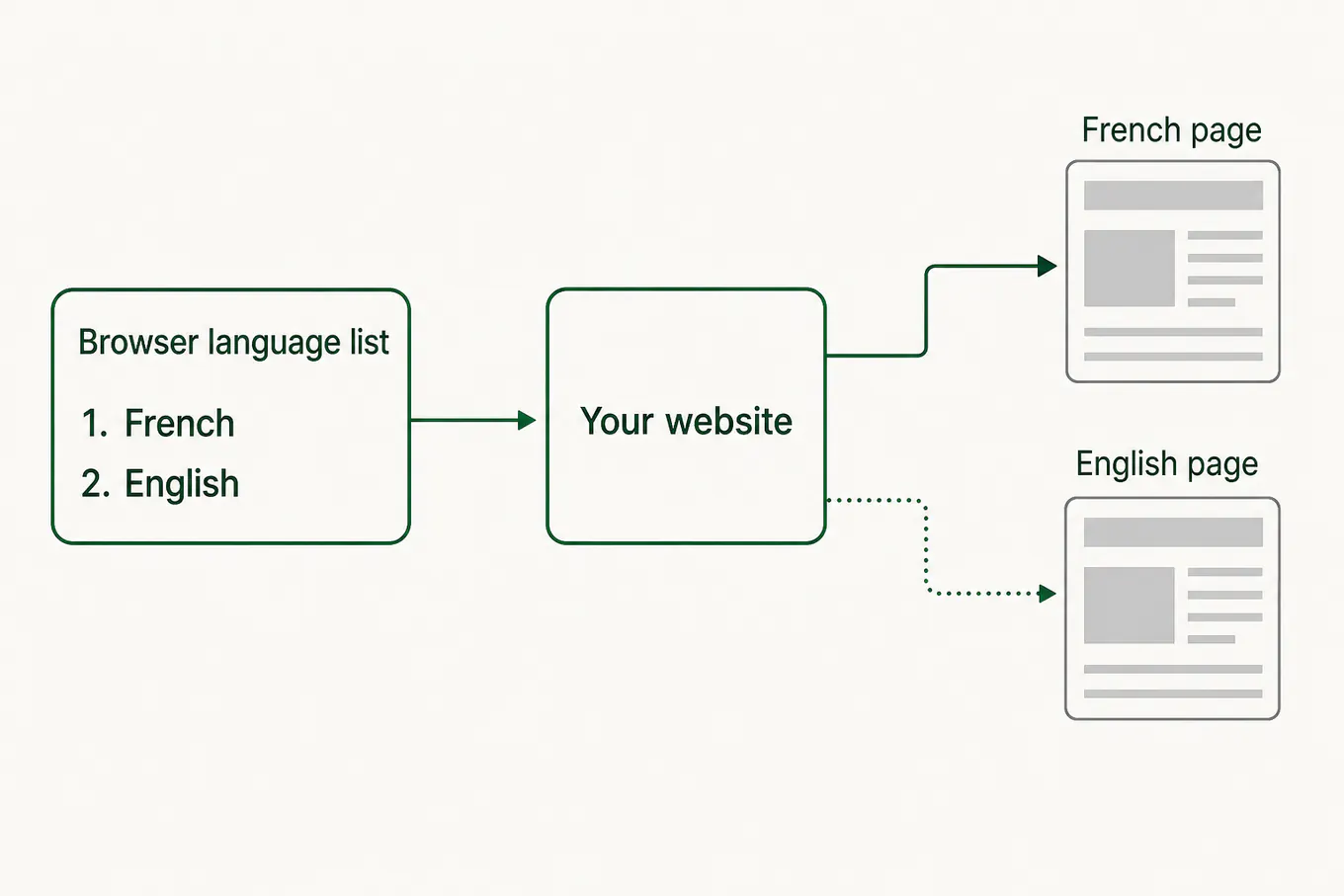
The list says which languages a person reads, which makes it a better guide than their location. Google tells site owners not to use IP analysis to adapt content, and calls it "difficult and generally not reliable". A visitor in Brussels may read French, Dutch or English, and an address cannot tell you which.
Still, the list is a weaker signal than it looks, for three reasons:
- It is usually set once, often by whoever set up the device, and many people never open that setting.
- For privacy, some browsers send a shorter list. As of November 2026, MDN notes that Safari always lists only one language, and Chrome does the same in incognito mode.
- Google's crawler sends no list at all, as above, so a site that reacts to the list behaves differently for Google than for most people.
Should you redirect based on browser language? Your three choices#
You have three options, from the most careful to the most forceful. For most business sites the middle one gives the best balance.
No redirect. Every URL shows what it says, and a switcher on every page does the rest. This is what Google's guide describes, and it suits a site whose visitors mostly arrive from search results that already match their language. The article on language switcher best practices covers where to put one.
Suggest. The page loads as requested, then a short line at the top offers the visitor's language, with a button to switch and a way to close it. The visitor decides. Search engines are unaffected, because the page they fetch is the page at the URL. This suits most sites with several languages.

Redirect. The site sends the visitor to another URL before they see anything. If you choose this, keep it narrow: only the bare home address (example.com/, which has no language of its own), and only on a first visit. Google's hreflang documentation names auto-redirecting home pages as one place to use x-default, so it expects some sites to have them. A page that already has a language in its address should never redirect.
Rules that keep a redirect safe for visitors and search#
If you suggest a language or redirect to one, these rules keep visitors in control and every language visible to search engines:
- Every language URL works on its own. Open /fr/contact with no language preference and you get the French contact page, every time. That is how Google's crawler arrives, and how anyone following a shared link arrives.
- Act only on a page without a language. The bare home address may choose a language for the visitor. A page such as /de/prices should never send anyone to /en/prices.
- Send visitors to the same page in their language. A visitor on the English returns page who prefers Spanish goes to the Spanish returns page, never to the Spanish home page. If that page has no translation yet, leave the visitor where they are.
- Remember the visitor's choice. Once someone picks a language with the switcher, or closes the banner, stop suggesting and never redirect them again. The W3C article describes the same pattern: when a user chooses a language, follow that choice from then on instead of the browser setting.
- Use the browser's language list, never the visitor's location. Location tells you a country, and many countries have more than one language.
- Keep the switcher on every page. A guess will sometimes be wrong, and the way back should be one click away.
- Mark the deciding page as x-default. If your home address redirects or asks visitors to pick a language, list it as the x-default in your hreflang tags. The article on self-referencing hreflang and x-default shows the tags.
- Make any redirect temporary. MDN describes a permanent redirect (301) as one meant to last forever, which search engine robots act on by updating the address they keep. A redirect that changes from one visitor to the next is not that, so use a temporary one (302 or 307).
How to check what your site does today#
You do not need a developer to see how your site behaves. Five checks, in one browser:
- Open a private window and visit your home page. Note the address you end up on.
- In your browser's language settings, move another of your site's languages to the top of the list. Reload the home page. Did the page change, or did a banner appear?
- Paste a link to one of your translated pages, such as the French contact page, into that window. You should land on exactly that page, in French.
- Pick a language with the switcher, open another page, and check that your choice stayed.
- In Google Search Console, run URL Inspection on a translated page and click View crawled page. The page Google fetched should be in that page's language.
If check 3 or check 5 fails, your redirect is hiding pages from someone, and that is the first thing to fix. When everything passes, set your browser's language list back the way it was.
Common questions#
Should the language suggestion be written in the visitor's language?#
Yes. Write the offer in the language you are offering, so a reader who cannot read the current page still understands it. The W3C gives the same advice for language links: write each one in its own language.
Does a redirect slow the page down?#
A little. Each redirect is one more trip across the network before the page starts to load, and Google's Lighthouse documentation says that extra trip can delay loading by hundreds of milliseconds. A suggestion banner adds no redirect at all.
What about visitors who use a VPN?#
A VPN changes where a visitor appears to be, and leaves their browser's language list as it was. That is one more reason to go by the language list rather than location: a German reader connected through a server in the Netherlands still reads German.
Is a language selection page on the home page a good idea?#
It costs every visitor a click before they see anything, including the visitors whose language you could have shown straight away. A home page in your main language with a suggestion banner usually serves people better. If you keep a selection page, mark it as the x-default in your hreflang tags.
Sources
The pages this one cites, with the day each was read.
- 01Managing multi-regional and multilingual sites (Google Search Central)developers.google.com, checked 18 November 2026
- 02How Google crawls locale-adaptive pages (Google Search Central)developers.google.com, checked 18 November 2026
- 03Tell Google about localized versions of your page (Google Search Central)developers.google.com, checked 18 November 2026
- 04Language negotiation and links on a multilingual site (W3C Internationalization)w3.org, checked 18 November 2026
- 05Navigator: languages property (MDN Web Docs)developer.mozilla.org, checked 18 November 2026
- 06Accept-Language header (MDN Web Docs)developer.mozilla.org, checked 18 November 2026
- 07Redirections in HTTP (MDN Web Docs)developer.mozilla.org, checked 18 November 2026
- 08Avoid multiple page redirects (Chrome for Developers, Lighthouse)developer.chrome.com, checked 18 November 2026
- 09URL Inspection tool (Search Console Help)support.google.com, checked 18 November 2026