
On this page
- What a bilingual website is, and who needs one
- Pick the second language from your customers, not a map
- Who writes the second language?
- One URL per language, under a folder
- Leave room for the longer language
- Let visitors switch, and remember the choice
- Keep both languages in step as the site changes
- A checklist before the second language goes live
- Common questions
- What is the difference between a bilingual and a multilingual website?
- Can I write the second language myself, without automatic translation?
- Will Google see the two languages as duplicate content?
- Should the language switcher use flags?
A bilingual website is one site in two languages: every page a customer needs exists in both, each language has its own web addresses, and a visitor can switch at any point. To set one up, pick the second language from your customers, give it its own folder, add a switcher, and keep both versions matching as the site changes.
Building the second language is the easy half. The harder half comes later, when the original pages keep changing and the translated ones fall behind without anyone noticing. This article covers both: how to set the site up, and a routine that keeps the two languages matching. If you are planning three languages or more, start with the guide to multilingual websites, which covers the wider decisions.
What a bilingual website is, and who needs one#
Most businesses that need one have a large share of customers who are more comfortable in a second language: a coastal hotel with English and Spanish speaking guests, say, or a shop in a region where two languages are spoken every day.
In the United States, the Census Bureau reports that the number of people who spoke a language other than English at home grew from 23.1 million in 1980 (about 1 in 10) to 67.8 million in 2019 (almost 1 in 5). Spanish was the most common of those languages, spoken by 62 percent of them in 2019. Your own market will have its own numbers. For many businesses, the second language belongs to a large group of customers they already serve.
A bilingual site is a smaller project than a multilingual one. You serve one extra market and keep one review routine, which makes it a good place to get the habits right before you ever add a third language.
Pick the second language from your customers, not a map#
Choose the language from evidence you already have. Look at:
- the languages your customers write to you in, by email, chat or reviews;
- the browser languages in your analytics, if your tool reports them;
- the countries your orders, bookings or enquiries come from;
- what your front desk, sales team or support staff already translate by hand.

A country and a language are different things. Visitors from Switzerland may read German, French or Italian, and a visitor from the United States may prefer Spanish. Pick the language your customers ask for, then decide whether one version of it is enough. For most bilingual sites one version is: a single Spanish site rather than separate pages for Spain and Mexico. If you choose Spanish, the guide to Spanish website translation covers the choices that come with it.
If you are still weighing whether the second market is worth the work, the article on building a localization strategy turns the same evidence into a one page plan with a budget.
Who writes the second language?#
You have three ways to get the words, and most bilingual sites mix them. Choose by how often the page changes and how much a mistake on it would cost you.
A common mix for a small business: the owner or a fluent colleague writes the pages that sell and the booking or contact pages, a professional translator handles terms and conditions, and the blog or news pages go through machine translation with a read by someone fluent. The article on machine versus human translation helps you sort your pages, and the one on post-editing machine translation explains what a good review of a machine draft involves.
One URL per language, under a folder#
Google's advice for sites in more than one language is to use different URLs for each language version of a page, rather than cookies or browser settings that change the language at the same address. When the language changes on one URL, Google warns that it might not find and crawl all your variations.
For a bilingual site, the simplest structure is a folder: example.com/ for the first language and example.com/es/ for the second. Google lists subdirectories as low maintenance because everything stays on the same host. Subdomains such as es.example.com and separate country domains also work, but they add setup, and a country domain ties the language to one country. Google does not recommend URL parameters such as ?lang=es. The article on subdomains versus subdirectories goes through the trade offs in more depth.
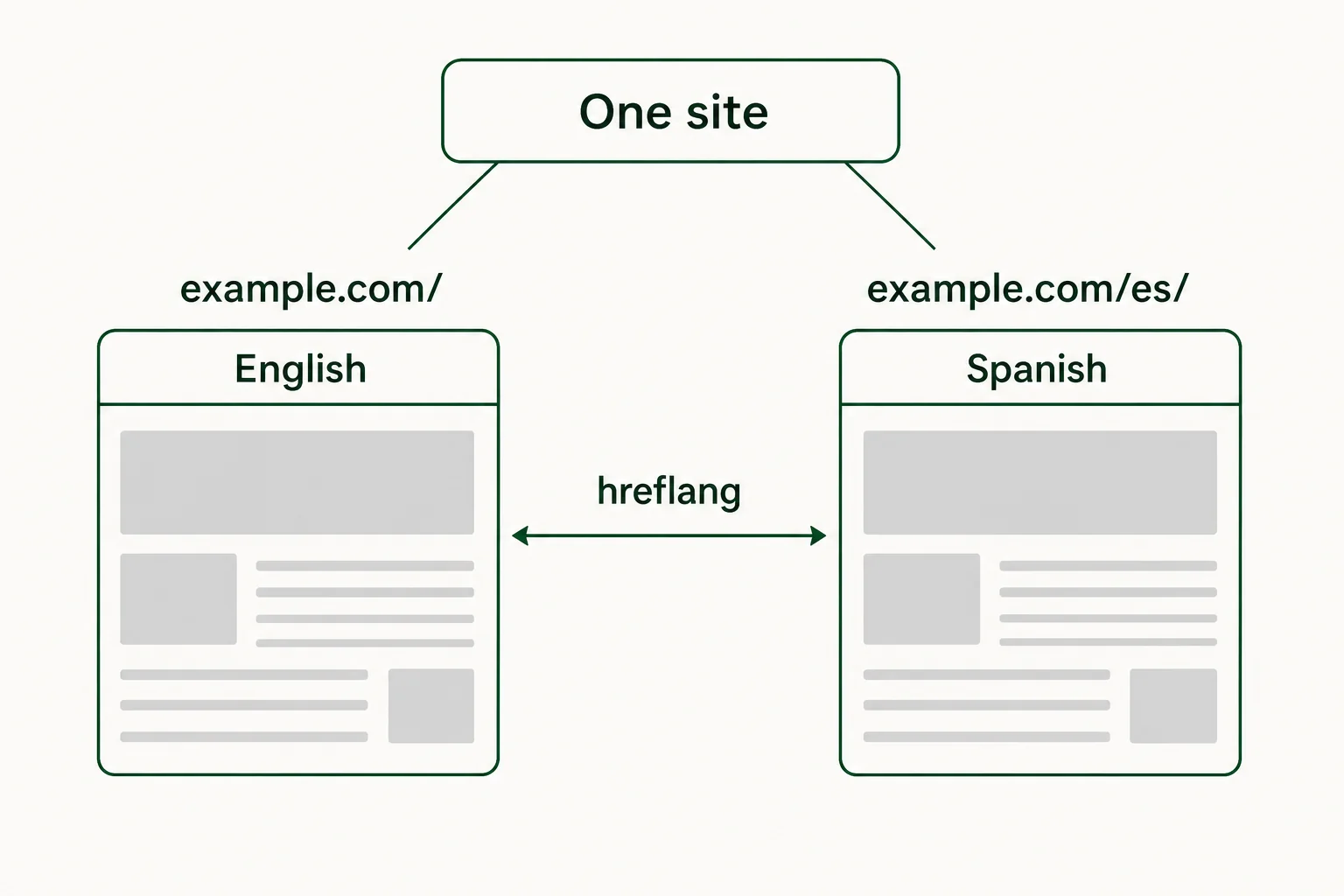
With the URLs decided, three small pieces of markup tell browsers and search engines which language each page is in:
- A
langattribute on thehtmlelement of every page, such as<html lang="es">. The W3C advises always declaring the default language of the page this way. - Hreflang links between the two versions of each page. Google asks that each version list itself as well as the other, so the English page names both the English and the Spanish URL, and the Spanish page does the same. Google accepts language codes from ISO 639-1, such as
enandes. - An
x-defaultentry for the version to show when neither language matches the visitor's browser setting. On a bilingual site that is usually your main language. The article on self-referencing hreflang and x-default has examples.
Translate the whole page, including the main text. Google notes that translating only the boilerplate, such as menus and footers, while the main content stays in one language can create a bad experience for the visitor.
Leave room for the longer language#
A translation is often longer than the original, and short text grows the most. The W3C, citing IBM's design guidelines, gives an average expansion from English into European languages of 200 to 300 percent for text up to 10 characters, and about 130 percent for text over 70 characters. Button labels, menu items and table headings are exactly that kind of short text. "Book now" is 8 characters; the Spanish "Reservar ahora" is 14.
Three checks before launch keep the layout from breaking:
- Let buttons, menus and headings grow. Open the longest translated page on a phone and look for labels that wrap onto two lines, overlap or get cut off.
- Keep words out of images. Text inside a banner or photo cannot be translated with the page, so each such image needs a second version, or the words move into the page itself.
- Read forms in the second language. Field labels, placeholder text and error messages are short, so they grow the most and are easy to forget.
Let visitors switch, and remember the choice#
Give every page a visible link to the same page in the other language. On a bilingual site this can be two plain words in the header, "English" and "Español", each written in its own language. A visitor looking for their language looks for its own name.
Be careful with automatic redirects. Google advises against automatically redirecting visitors from one language version to another, because those redirects can stop people and search engines from seeing every version. Its advice is to link to the other language versions instead. If you want to point a new visitor to the other language, a small banner they can close is gentler than a redirect.
Once a visitor has chosen, keep them in that language. Links inside the Spanish pages should point to Spanish pages, and a visitor who picked Spanish should not land back on English when they open the menu. The article on language switcher best practices covers placement, labels and accessible markup.
Keep both languages in step as the site changes#
Launch day is when both versions match best. After that, every edit to the original opens a gap: a new opening time, a changed price, a seasonal offer, a fresh blog post. If nobody owns that gap, the second language drifts months behind, and the visitors who read it get older information than everyone else.
A routine that works for one person looking after the site:
- Make one language the source, and write and edit in it first. An edit made only in the translation is easy to lose the next time the source page changes.
- Keep a list of what changed. After each edit, note the page and the change, or use a tool that finds changed text on its own. What you want is a list of pages whose translation is now out of date.
- Translate only the changed paragraphs. The rest of the approved translation stays as it was, so you are not paying for or rereading text that was already fine.
- Look twice at anything that carries risk. Prices, opening times, dates and legal text deserve a second read before the update goes live. The translation QA checklist lists what to look at.
- Keep a short glossary of your product names, room types and the words you never translate. A translation glossary means every update uses the same terms.
Pick a rhythm you will actually keep. Some sites translate every change the same day; others collect changes and update the second language once a week. Either works, as long as the list of out of date pages gets back to zero on a regular day. If you are weighing who does the translating, the article on what website translation costs compares the options.
A checklist before the second language goes live#
Before you announce the second language, go through each item on a phone and on a computer:
- Every page a customer needs exists in both languages, including contact, booking or checkout pages.
- Each language has its own URLs, under its own folder.
- Every page declares its language with the
langattribute. - Both versions of each page carry hreflang links to themselves and to each other, plus
x-default. - The switcher is visible on every page and links to the same page in the other language.
- No page redirects a visitor to a language they did not choose.
- Page titles, meta descriptions, image alt text, buttons and form messages are translated.
- Prices, dates, phone numbers and addresses read correctly in the second language.
- Emails the site sends, such as a booking confirmation, exist in both languages.
- On a shop, the cart, checkout and order emails read in the second language. The guide to ecommerce translation lists the shop text that is easy to miss.
- One person owns the routine for keeping the two versions matching, and knows which day it runs.
A site that passes this list is ready for visitors in both languages. Run the list again whenever you add a new kind of page, such as a booking form or a product category, because a new template can bring in text that was never translated.
Common questions#
What is the difference between a bilingual and a multilingual website?#
A bilingual website has two languages; a multilingual one has more. The setup is the same: one URL per language, hreflang between the versions and a switcher on every page. Each extra language adds another version to keep current every time the original changes.
Can I write the second language myself, without automatic translation?#
Yes. If you or someone on your team writes the language well, you can create each page by hand and link the two versions. Plan the time for updates too: every change to the original page means a change to the translation.
Will Google see the two languages as duplicate content?#
Google's advice on duplicate pages in multilingual sites is about similar content in the same language, such as German text on two different addresses. For the same content in two languages, it recommends a separate URL for each language, marked up with hreflang, which is the setup described above.
Should the language switcher use flags?#
Use the name of each language, written in that language. A flag stands for a country, and many languages are spoken in more than one country, so a Spanish flag can look wrong to a visitor from Mexico.
Sources
The pages this one cites, with the day each was read.
- 01Managing multi-regional and multilingual sites (Google Search Central)developers.google.com, checked 13 November 2026
- 02Tell Google about localized versions of your page (Google Search Central)developers.google.com, checked 13 November 2026
- 03Declaring language in HTML (W3C Internationalization)w3.org, checked 13 November 2026
- 04Nearly 68 Million People Spoke a Language Other Than English at Home in 2019 (U.S. Census Bureau, 2022)census.gov, checked 13 November 2026
- 05Text size in translation (W3C Internationalization)w3.org, checked 13 November 2026